

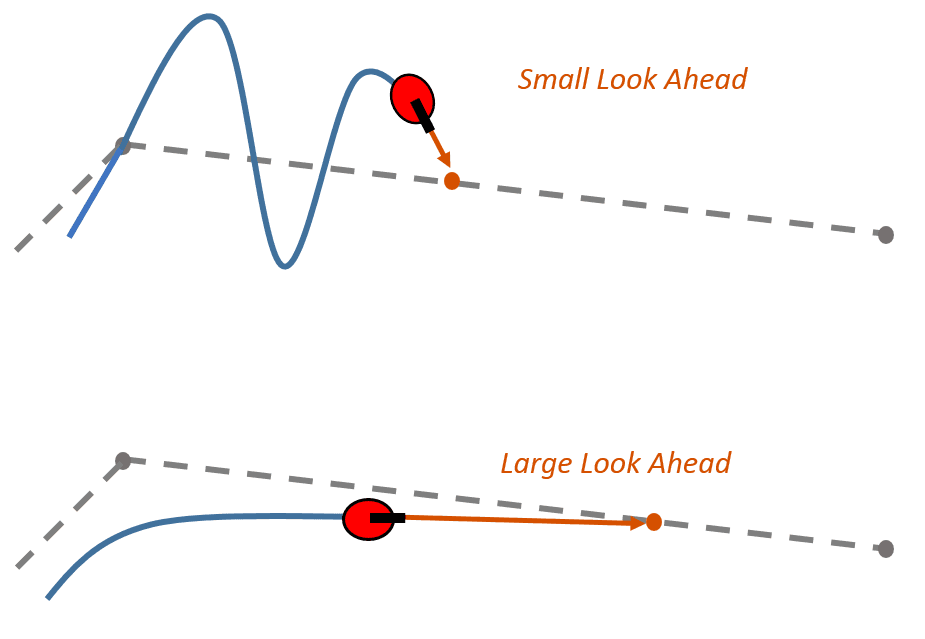
Pure Pursuit

Pure Pursuit

Thuật toán Pure Pursuit để robot bám theo đường đi mượt mà.

Thuật toán Pure Pursuit để robot bám theo đường đi mượt mà.

Level

Expert

Source

Source

Author

Author

FTC Lib

FTC Lib

Translator

Translator

FTC26749 aDudu

FTC26749 aDudu

Date Published

Date Published

Jan 18, 2026

Jan 18, 2026

package: com.arcrobotics.ftclib.purepursuit

Lưu ý quan trọng: Phần triển khai này còn lỗi (buggy) và sẽ được thay thế trong phiên bản FTCLib tiếp theo. Hiện tại không khuyến nghị sử dụng (not recommended).

Pure Pursuit

Thuật toán Pure Pursuit trong FTCLib được phát triển nhằm giúp người dùng chỉ cần thêm các waypoint (điểm đường) mong muốn và gọi phương thức followPath() trong lớp Path.

Để sử dụng, bạn cần truyền vào:

  • mecanum drivetrain (hệ truyền động mecanum)

  • odometry (hệ thống định vị) của robot

Khi phương thức hoàn tất, nó sẽ trả về true hoặc false tùy theo việc thực thi có thành công hay không.

Ngoài ra, bạn có thể sử dụng phương thức loop()trực tiếp truyền các vị trí odometry vào đó. Hãy đảm bảo bạn cập nhật odometry sau mỗi vòng lặp (iteration).

What is Pure Pursuit? (Pure Pursuit là gì?)

Pure Pursuit, còn được gọi tắt là “PP”, là một thuật toán theo dõi đường đi (path tracking algorithm) dùng để tính toán vận tốc robot nhằm đi tới một điểm nhìn trước (look-ahead point) từ vị trí hiện tại.

Thuật toán này theo đường đi một cách tương đối (loosely), dựa trên một tập hợp các waypoints – tức các tọa độ trên sân đấu.

Cách hoạt động của bộ điều khiển pure pursuit:

  • Tạo một vòng tròn với bán kính xác định

  • “Nhìn trước” dọc theo đường đi để tìm điểm giao (intersection) giữa vòng tròn và đường

  • So sánh hướng robot (heading) với bán kính nối từ tâm robot đến điểm giao đó

  • Robot di chuyển tương ứng để tiến tới điểm giao

Bán kính này có thể tùy chỉnh riêng cho từng waypoint để tăng độ chính xác
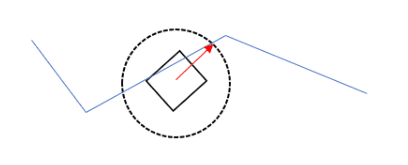
Minh họa trực quan cho cơ chế look-ahead

Robot liên tục theo dõi điểm giao này theo thời gian thực.
Đó chính là cách robot “theo” đường đã chỉ định.

Về bản chất, thuật toán này hoạt động như một bộ điều khiển P (P controller – bộ điều khiển tỷ lệ) cho hướng quay, cho phép robot di chuyển với tốc độ nhanh nhất có thể dọc theo đường đi.

Chú giải:

  • P controller: bộ điều khiển chỉ dùng thành phần tỷ lệ (Proportional) để điều chỉnh sai số

  • Heading: hướng quay của robot (góc xoay)

Waypoints (Các loại điểm đường)

5 loại waypoint:

  1. StartWaypoint – điểm bắt đầu của đường đi

  2. GeneralWaypoint – waypoint thông thường, dùng thuật toán look-ahead

  3. InterruptWaypoint – waypoint cho phép thực hiện hành động xen ngang

  4. PointTurnWaypoint – waypoint dừng lại, quay tại chỗ rồi tiếp tục

  5. EndWaypoint – waypoint kết thúc đường đi

Waypoint bắt đầu là điểm đầu tiên của path; waypoint kết thúc là điểm cuối cùng.

Phân biệt chi tiết

  • GeneralWaypoint: robot di chuyển theo thuật toán pure pursuit thông thường

  • PointTurnWaypoint: robot dừng lại → quay → tiếp tục

  • InterruptWaypoint: một dạng PointTurnWaypoint, cho phép thực hiện hành động khác (ví dụ: nhặt Skystone)

Creating Waypoints (Tạo Waypoint)

Bạn có thể tạo waypoint bằng cách gọi các constructor khác nhau.

StartWaypoint

// Constructor rỗng – chỉ dùng nếu bạn định set giá trị sau.
Waypoint p1 = new StartWaypoint();
// Với Pose2d.
Waypoint p1 = new StartWaypoint(pose2d);
// Với toạ độ X và Y.
Waypoint p1 = new StartWaypoint(x, y);
// Với Translation2d.
Waypoint p1 = new StartWaypoint(translation2d);
// Constructor rỗng – chỉ dùng nếu bạn định set giá trị sau.
Waypoint p1 = new StartWaypoint();
// Với Pose2d.
Waypoint p1 = new StartWaypoint(pose2d);
// Với toạ độ X và Y.
Waypoint p1 = new StartWaypoint(x, y);
// Với Translation2d.
Waypoint p1 = new StartWaypoint(translation2d);

GeneralWaypoint

Mỗi GeneralWaypoint sẽ kế thừa (inherit) cấu hình từ waypoint trước đó trong path.

  • Chỉ bắt buộc xác định x và y

  • Có thể tùy chỉnh các tham số khác

PointTurnWaypoint, InterruptWaypoint, EndWaypoint đều lớp con (subclass) của GeneralWaypoint

Quá trình kế thừa này diễn ra trong phương thức init() của Path.

// Constructor rỗng.
Waypoint p2 = new GeneralWaypoint();
// Với X và Y – kế thừa cấu hình từ waypoint trước.
Waypoint p2 = new GeneralWaypoint(x, y);
Các constructor đầy đủ
// Translation2d + Rotation2d
Waypoint p2 = new GeneralWaypoint(
    translation2d, rotation2d,
    movementSpeed, turnSpeed,
    followRadius
);
// Pose2d
Waypoint p2 = new GeneralWaypoint(
    pose2d, movementSpeed, turnSpeed,
    followRadius
);
// X, Y
Waypoint p2 = new GeneralWaypoint(
    x, y, movementSpeed,
    turnSpeed, followRadius
);
// X, Y + góc ưu tiên
Waypoint p2 = new GeneralWaypoint(
    x, y, rotationRadians,
    movementSpeed, turnSpeed,
    followRadius
);
// Constructor rỗng.
Waypoint p2 = new GeneralWaypoint();
// Với X và Y – kế thừa cấu hình từ waypoint trước.
Waypoint p2 = new GeneralWaypoint(x, y);
Các constructor đầy đủ
// Translation2d + Rotation2d
Waypoint p2 = new GeneralWaypoint(
    translation2d, rotation2d,
    movementSpeed, turnSpeed,
    followRadius
);
// Pose2d
Waypoint p2 = new GeneralWaypoint(
    pose2d, movementSpeed, turnSpeed,
    followRadius
);
// X, Y
Waypoint p2 = new GeneralWaypoint(
    x, y, movementSpeed,
    turnSpeed, followRadius
);
// X, Y + góc ưu tiên
Waypoint p2 = new GeneralWaypoint(
    x, y, rotationRadians,
    movementSpeed, turnSpeed,
    followRadius
);

PointTurnWaypoint

Buffer ở đây là sai số cho phép (expected error) – dùng để tạo dung sai cho việc robot có thể lệch nhẹ khỏi vị trí hoặc góc mong muốn.

Waypoint p3 = new PointTurnWaypoint();
Waypoint p3 = new PointTurnWaypoint(
    translation2d, rotation2d,
    movementSpeed, turnSpeed,
    followRadius, positionBuffer,
    rotationBuffer
);
Waypoint p3 = new PointTurnWaypoint();
Waypoint p3 = new PointTurnWaypoint(
    translation2d, rotation2d,
    movementSpeed, turnSpeed,
    followRadius, positionBuffer,
    rotationBuffer
);

InterruptWaypoint

InterruptAction là một interface cho phép người dùng tự định nghĩa hành động tùy chỉnh tại waypoint này.
Khuyến nghị dùng chung với command-based paradigm của FTCLib.

Waypoint p4 = new InterruptWaypoint(
    x, y, movementSpeed, turnSpeed,
    followRadius, positionBuffer,
    rotationBuffer, action
);
Waypoint p4 = new InterruptWaypoint(
    x, y, movementSpeed, turnSpeed,
    followRadius, positionBuffer,
    rotationBuffer, action
);

Ví dụ dùng lambda (Java 8):

Waypoint p4 = new InterruptWaypoint(
    x, y, movementSpeed, turnSpeed,
    followRadius, positionBuffer,
    rotationBuffer, grabSubsystem::grabBlock
);
Waypoint p4 = new InterruptWaypoint(
    x, y, movementSpeed, turnSpeed,
    followRadius, positionBuffer,
    rotationBuffer, grabSubsystem::grabBlock
);

EndWaypoint

Waypoint p5 = new EndWaypoint();

Lưu ý: EndWaypoint bắt buộc phải có preferred angle (góc ưu tiên).

Creating the Path (Tạo Path)

Trước khi gọi loop() hoặc followPath():

Path m_path = new Path(p1, p2, p3, p4, p5);
m_path.init();
Path m_path = new Path(p1, p2, p3, p4, p5);
m_path.init();

Nếu path không hợp lệ, chương trình sẽ ném exception.

Intersections (Điểm giao)

Intersection là điểm mà:

  • Vòng tròn follow radius quanh robot

  • Giao với đường path tạo từ các waypoint

FTCLib mặc định dùng order controlled (điều khiển theo thứ tự waypoint), ổn định và ít lỗi hơn so với heading controlled.

Nếu muốn dùng heading controlled (không khuyến nghị):

m_path.setPathType(PathType.HEADING_CONTROLLED);

Retrace (Tái truy vết đường)

Retrace là tính năng độc quyền của FTCLib:

  • Khi robot mất path

  • Hệ thống tự động tạo đường tạm quay lại path gần nhất

Mặc định được bật.

Tắt retrace (không khuyến nghị):

m_path.disableRetrace();

Timeouts (Giới hạn thời gian)

// Toàn bộ path
m_path.setWaypointTimeouts(timeout);
// Theo từng waypoint
m_path.setWaypointTimeouts(p1_timeout, p2_timeout, p3_timeout, ...);
// Reset
m_path.resetTimeouts();
// Toàn bộ path
m_path.setWaypointTimeouts(timeout);
// Theo từng waypoint
m_path.setWaypointTimeouts(p1_timeout, p2_timeout, p3_timeout, ...);
// Reset
m_path.resetTimeouts();

Resetting the Path

m_path.reset();
m_path.reset();

Using followPath()

followPath() là cách tự động hóa hoàn toàn thuật toán Pure Pursuit.

m_path.followPath(m_robotDrive, m_robotOdometry);

Hạn chế:
Không gọi được update() của odometry → thay vào đó dùng updatePose().

Creating Your Odometry

Odometry cần được tạo bằng Suppliers (functional interface, dùng lambda).

HolonomicOdometry m_robotOdometry = new HolonomicOdometry(
    leftValue, rightValue, horizontalValue, trackWidth,
    centerWheelOffset
);
HolonomicOdometry m_robotOdometry = new HolonomicOdometry(
    leftValue, rightValue, horizontalValue, trackWidth,
    centerWheelOffset
);

Creating Suppliers

DoubleSupplier leftValue, rightValue, horizontalValue;
leftValue = () -> ticksToInches(m_lOdom.getCurrentPosition());
rightValue = () -> ticksToInches(m_rOdom.getCurrentPosition());
horizontalValue = () -> ticksToInches(m_hOdom.getCurrentPosition());
DoubleSupplier leftValue, rightValue, horizontalValue;
leftValue = () -> ticksToInches(m_lOdom.getCurrentPosition());
rightValue = () -> ticksToInches(m_rOdom.getCurrentPosition());
horizontalValue = () -> ticksToInches(m_hOdom.getCurrentPosition());

Using loop()

loop() cho phép bạn tự kiểm soát toàn bộ phần cứng, không cần Suppliers.

double speeds[] = m_path.loop(x, y, heading);

Nếu trả về {0, 0, 0}:

  1. Path timeout

  2. Mất path và retrace bị tắt

  3. Đã đến đích

Using the PurePursuitCommand

Đây là cách khuyến nghị nhất nếu dùng command-based paradigm.

OdometrySubsystem

OdometrySubsystem m_odometry = new OdometrySubsystem(
    m_robotOdometry
);
OdometrySubsystem m_odometry = new OdometrySubsystem(
    m_robotOdometry
);

Subsystem sẽ tự động cập nhật trong periodic().

Creating a PurePursuitCommand

PurePursuitCommand ppCommand = new PurePursuitCommand(
    m_robotDrive, m_odometry,
    p1, p2, p3, p4, p5
);
ppCommand.schedule();
PurePursuitCommand ppCommand = new PurePursuitCommand(
    m_robotDrive, m_odometry,
    p1, p2, p3, p4, p5
);
ppCommand.schedule();

Running the Command

Command được chạy thông qua CommandScheduler, giống các command khác trong FTCLib.

ADUDU

A proud team of passionate Robotics Enthusiasts competing in nation-wide Technology competitions in Vietnam, the FIRST Tech Challenge and the FIRST Robotics Competition.

Copyright ©

, all rights reserved

Made by aDudu's Programming Department

made by aDudu

made by aDudu

Pure Pursuit